If you have forgotten your HappyFox Help Desk password or cannot sign in, request a password-reset email from your organization's staff login page. These steps apply to agents, managers, administrators, and the Account Administrator.
Available on all plans.
Authentication note: These steps require standard HappyFox username-and-password login to be enabled. If your organization uses single sign-on (SSO) and standard login is disabled, contact your administrator or see Accessing your HappyFox account when your SSO service is down.
If you are already signed in and know your current password, see Change your password while signed in.
Reset your password
- Open your organization's HappyFox Help Desk staff login page. The URL is usually https://accounturl.happyfox.com/staff, but your organization may use a custom domain.
- Select Forgot password.
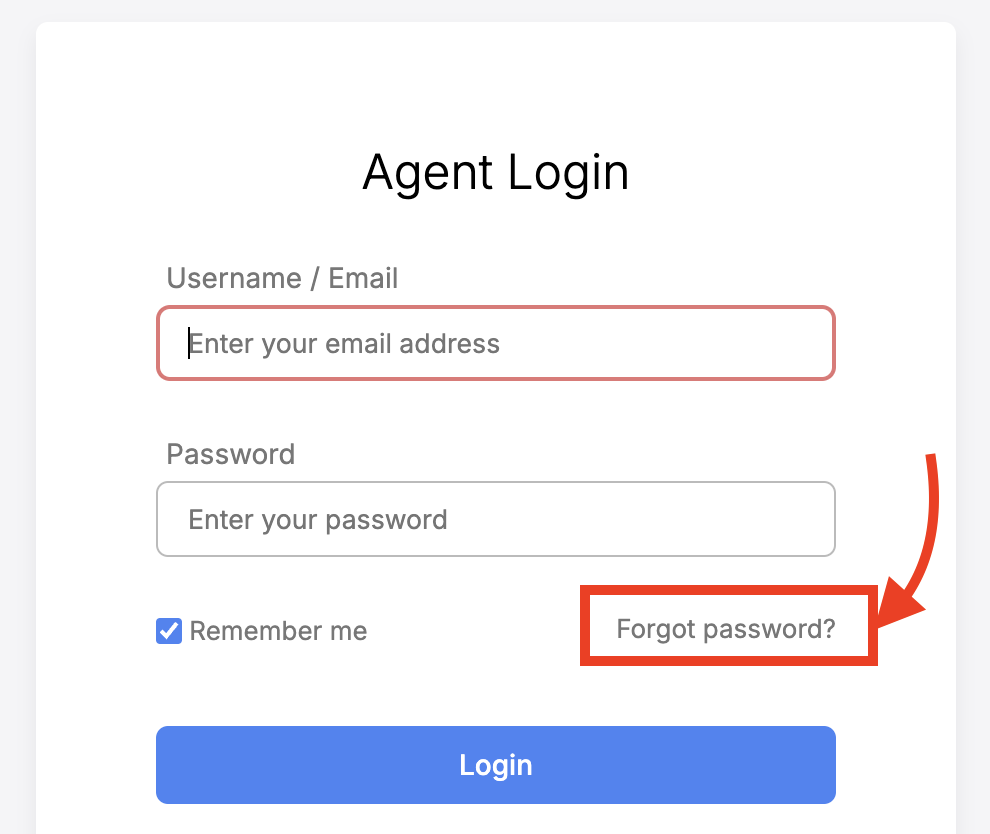
- Enter the email address you use to sign in.
- Submit the request.
- Open the password-reset email from HappyFox Help Desk and select the reset link.
- Enter and confirm your new password, then save it.
- Return to the agent login page and sign in with your new password.
If the link has expired: Return to the login page and request another password-reset email. Only use the most recent reset link.
Make sure you are on the staff login page: The customer or contact portal has a different login and cannot reset an agent password. Look for /staff/ in the URL
Troubleshooting
I didn't receive the reset email
- Confirm that you requested the reset from the staff login page, not the customer or contact portal.
- Confirm that you entered the email address associated with your agent account.
- Check your spam or junk folder.
- Allow a few minutes for the message to arrive, then submit one new request.
- Ask your HappyFox administrator to confirm the email address on your agent profile.
My reset link doesn't work
- Make sure you opened the most recent password-reset email.
- If the link has expired, request a new one from the login page.
- Open the full link in a supported browser without modifying it.
I can't find the agent login page
- Try your HappyFox account URL followed by /staff, such as https://accounturl.happyfox.com/staff.
- If your organization uses a custom domain, ask your HappyFox administrator for the staff login URL.
- Do not use the customer or contact portal login; it is for contacts, not agents.
I'm still locked out after resetting my password
Changing your password may not remove an account lock caused by repeated unsuccessful sign-in attempts. Contact a HappyFox administrator who has permission to unlock agents.