HappyFox's support center builder lets you customize the visual appeal of your login page. You can change everything from your login page's banner, background, and colors to the login form, labels, and anchors – all from using a simple widget-based builder⚡️.
Applicable Plans: ✔️ Mighty ✔️ Fantastic ✔️ Enterprise ✔️ Enterprise Plus
A quick guide to customize your Login Page:
- Log in to your HappyFox agent panel.
- Navigate to Support Center >> Look and Feel from the module switcher.
- Click "Login" from the list of pages available for customization.
- Customize the various "Layout options" on the right sidebar with relevant configurations.
- Use the handy "toggle" inside a layout option to show/hide the widget.
- Click "Save" to save the current configuration as a draft. The changes saved will now reflect on the inbuilt site preview.
- Click "Publish" to confirm your changes made to your actual support center login page.
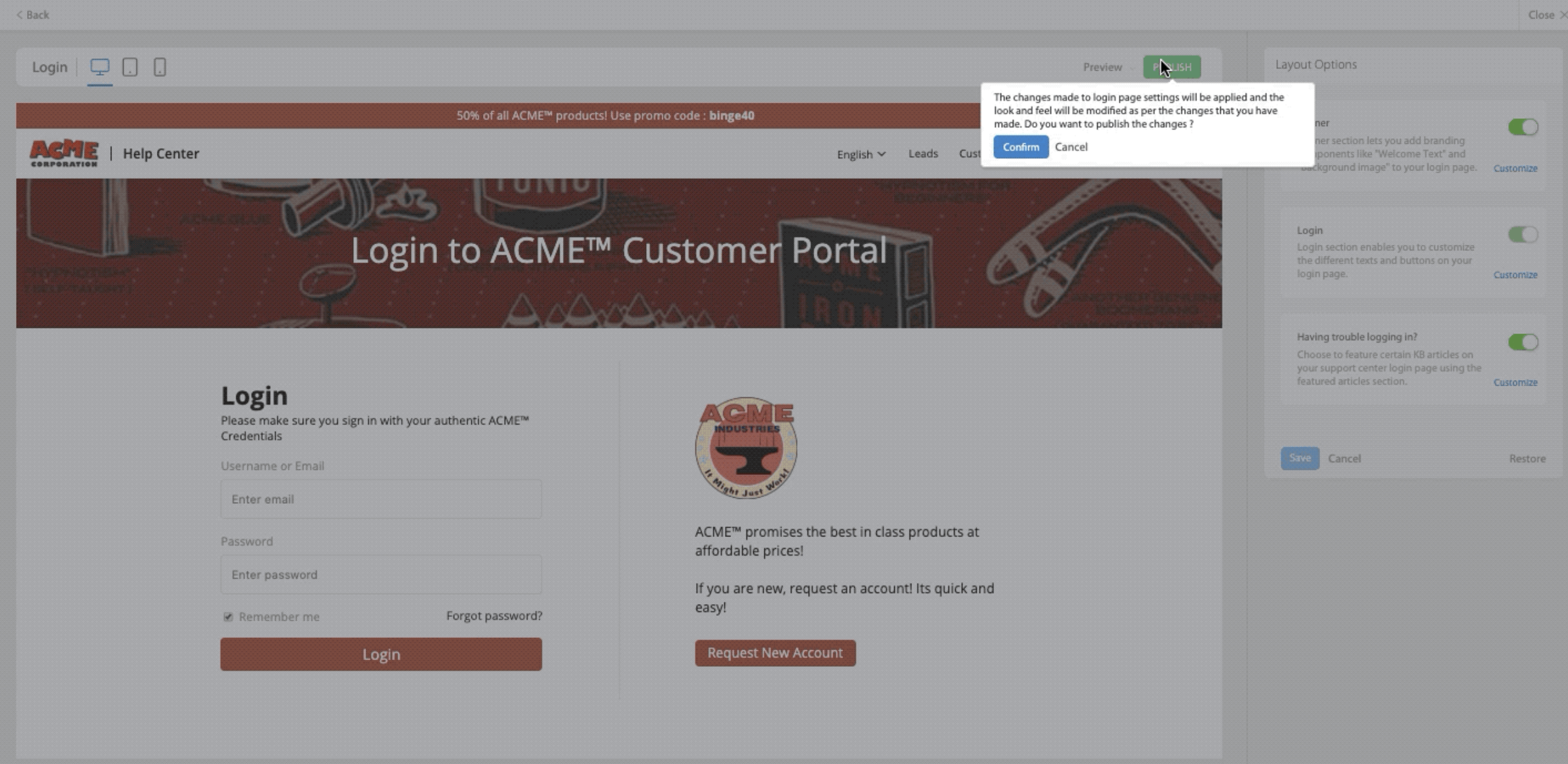
Note: The header and footer are inherited from the Home Page. To know more about Home page customizations, click here.
Layout options components explained:
- Banner:
- This component lets you customize the colors, images, and texts of your Login page banner.
- You could add a lively banner image to your Login page with the built-in image uploader.
- The height of the login page banner is 170 pixels. Please upload a PNG/JPG/BMP image with resolution greater than 1280*170 and use the built-in re-sizer to fit.
- Use the "Overlay Opacity" to add a layer of transparency to your banner image.
- Also, you could specify a background color to your banner that matches your brand colors.
- Specify the welcome text and its color. The welcome text is present in the center of your banner.
- Login:
- This component allows you to customize the different texts and buttons present on your main login section.
- The description text editor lets you provide contextual brand-specific texts/images to your login page.
- Note: You cannot disable this component from the login page.
- Featured Articles:
- This component lets you selectively feature certain external knowledge base articles on your login page.
- Note: This component is turned off by default.

Frequently Asked Questions
1) How do I customize other login related pages like forgot password, request new account pages, etc.?
A: At the moment it is not possible to customize other login-related pages. The colors and styles specified in the login page will be applied correspondingly in all login-related pages. For example, the banner inside the "Forgot Password" page will have the same background color as the login page banner.
2) What are the different login options and How do I change them?
A: HappyFox provides three different ways for your customers to log in to their contact portal:
- Email and Password. [Recommended]
- Email and Ticket id.
- Email-only.
To modify this setting, navigate to Manage >> Account Settings >> Support Center Settings >> Contact Login Options.
3) How can I customize header and footer for my login page?
A: Header and Footer are uniform for your entire support center. You can customize them at Home Page customization.
4) How do I add Single Sign-on (SSO) links to my Login Page?
A: To add SSO links in your Login page, you would have to integrate a third-party identity provider. Learn more about the different SSO providers supported by HappyFox here. Once successfully integrated, make sure you have set the integration as "active" for them to start showing up in your login page.
5) How do I disable traditional Login methods on my Login page?
A: To disable the traditional login methods like email/password entirely, you must configure a SAML based SSO first. Once configured, learn more about the additional steps here.