An Incoming Chat alert lets you accept a HappyFox Messaging request or dismiss the alert for yourself.
Before you start
Be signed in, Available for Messaging, and associated with the incoming category. Your role needs Assign tickets and Add reply via agent panel permissions. See Configure permissions for Messaging agents and admins.
Accept or ignore
- Review the Incoming Chat alert.
- Select Accept to open the conversation and take ownership.
- Read the contact's request and send your first reply.
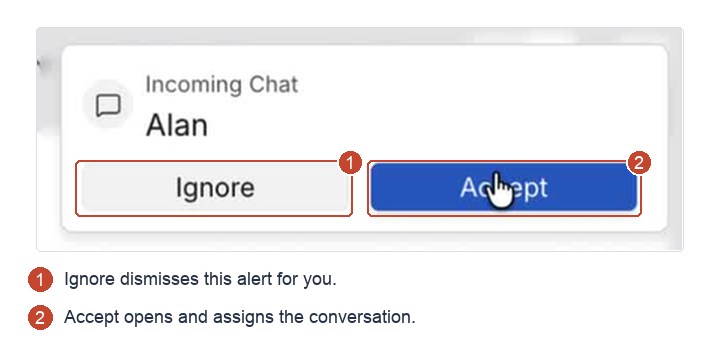
The name shown is sample data. If the contact came through ChatBot, its transcript appears at handoff. Scroll up to review it before asking for information they have already provided.
Select Ignore when you cannot pick up the request. It dismisses the alert for you; other eligible agents who received it still see it. Become Unavailable if you are stepping away from all requests.
Which agents receive the alert
Alerts follow your category's auto-assignment rules and Messaging availability:
- With Simple Round Robin, the alert goes to the auto-assigned agent.
- With other strategies, available category agents can receive the alert before assignment. If someone accepts first, that assignment is preserved. If auto-assignment happens first, other agents' alerts close.
- If all agents have reached their automatic assignment throttle, the conversation stays unassigned. Available agents can still accept it manually.
Send the first reply
If no reply is sent within 10 minutes of the handoff, the contact receives a message that the team is busy and will follow up. Accepting alone does not count as a reply.
Continue with Reply to a conversation and exchange attachments. Use Why am I not receiving conversation alerts or hearing notification sounds? if alerts are missing.