Available on all plans
GDPR Preferences let you add a consent checkbox and message to the forms contacts affected by GDPR fill out: the contact registration form and the new ticket form.
Permission needed: "Manage Support Center settings" and "Manage Support Center GDPR Settings", both grantable to any role. Account admins have both by default.
Steps:
- Log in to your HappyFox Agent Portal.
- Go to Main Menu > Support Center > GDPR.
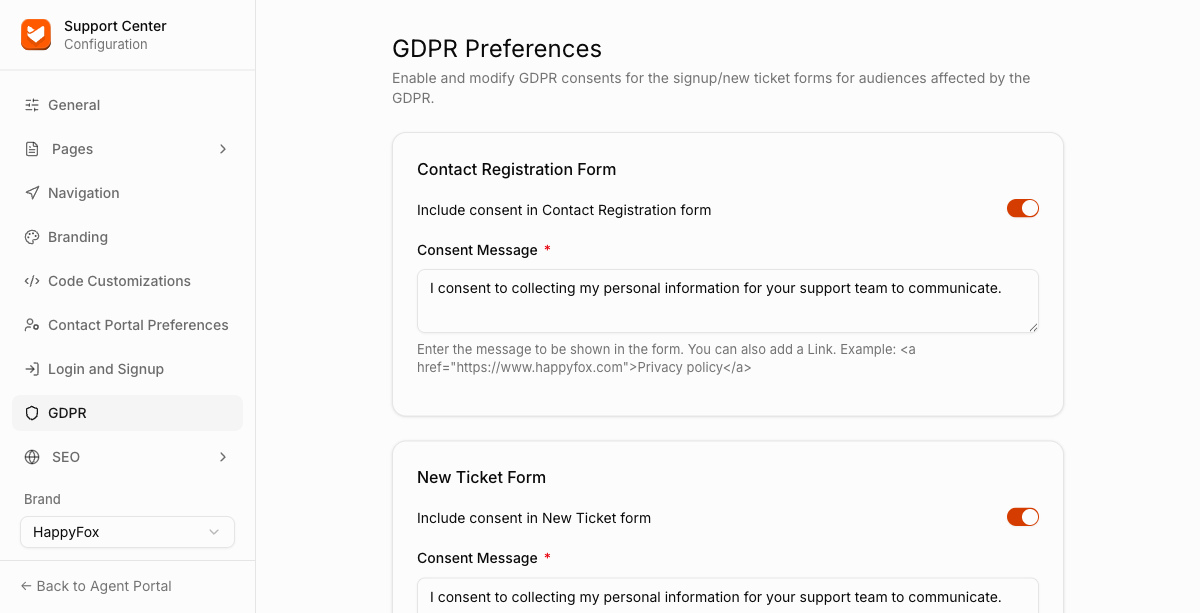
Contact Registration Form
| Setting | Description |
|---|---|
| Include consent in Contact Registration form | Shows the consent checkbox on signup. |
| Consent Message | The text shown next to the checkbox. You can aslo include a link, for example: <a href="https://www.happyfox.com">Privacy policy</a>. |
New Ticket Form
| Setting | Description |
|---|---|
| Include consent in New Ticket form | Toggles the consent checkbox on the new ticket form. |
| Consent Message | Same format as above, configured separately for this form. |