Available on all plans
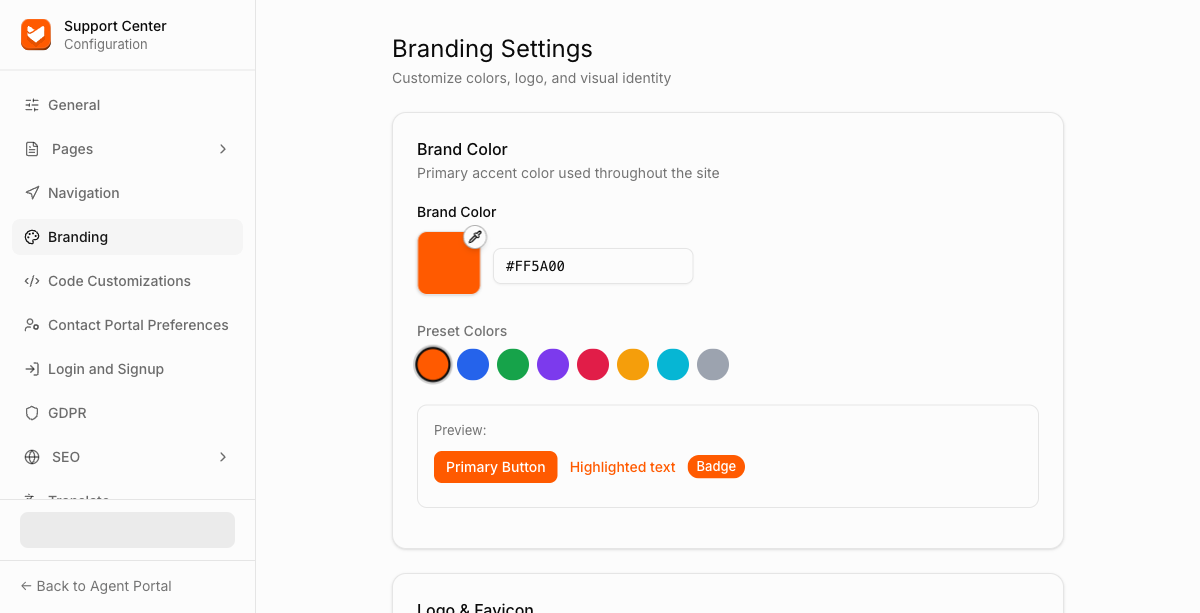
Branding controls the visual identity of your Support Center: one accent color applied across the whole site, plus your logo and favicon. There's no per-element color picker or font selection, one Brand Color is applied consistently to buttons, links, and badges.
Permission needed: "Manage Support Center settings" (to access the module) and "Customize look and feel of Support Center pages" (to use this page), both grantable to any role. Account admins have both by default.
Steps:
- Log in to your HappyFox Agent Portal.
- Go to Main Menu > Support Center > Branding.
Brand Color
Enter a hex code or pick one of the preset swatches. This single color is used for primary buttons, highlighted text, and badges across your Support Center. A live preview box shows how a Primary Button, Highlighted text, and a Badge will look with the color you've chosen.
Logo & Favicon
Logo
Your main Support Center logo (PNG, JPG, or JPEG, max 5 MB).
Dark Theme Logo
An optional alternate logo shown when the portal is displayed in dark mode.
Logo Link To
The URL your logo links to when clicked.

Favicon
The small icon shown in the browser tab (PNG, JPG, JPEG, or ICO, max 5 MB).
FAQs
Q: Can I set different colors for text, links, and buttons separately?
A: No. A single Brand Color is applied consistently across the interface, there's no per-element color picker.