LogMeIn Rescue integration allows you to provide remote support to your customers and log session messages back in HappyFox.
Integrating LogMeIn Rescue with HappyFox allows your support agents to:
- Create a LogMeIn Rescue remote support session from a HappyFox ticket.
- Directly share the remote support session link with the customer via a ticket-reply.
- Access Technician console using the link provided on a HappyFox ticket.
- Automatically capture details about a remote support session including chat transcript as a HappyFox ticket update.
You will need an active LogMeIn account to enable integration with HappyFox.
Available in all pricing plans
Steps to enable HappyFox integration with LogMeIn:
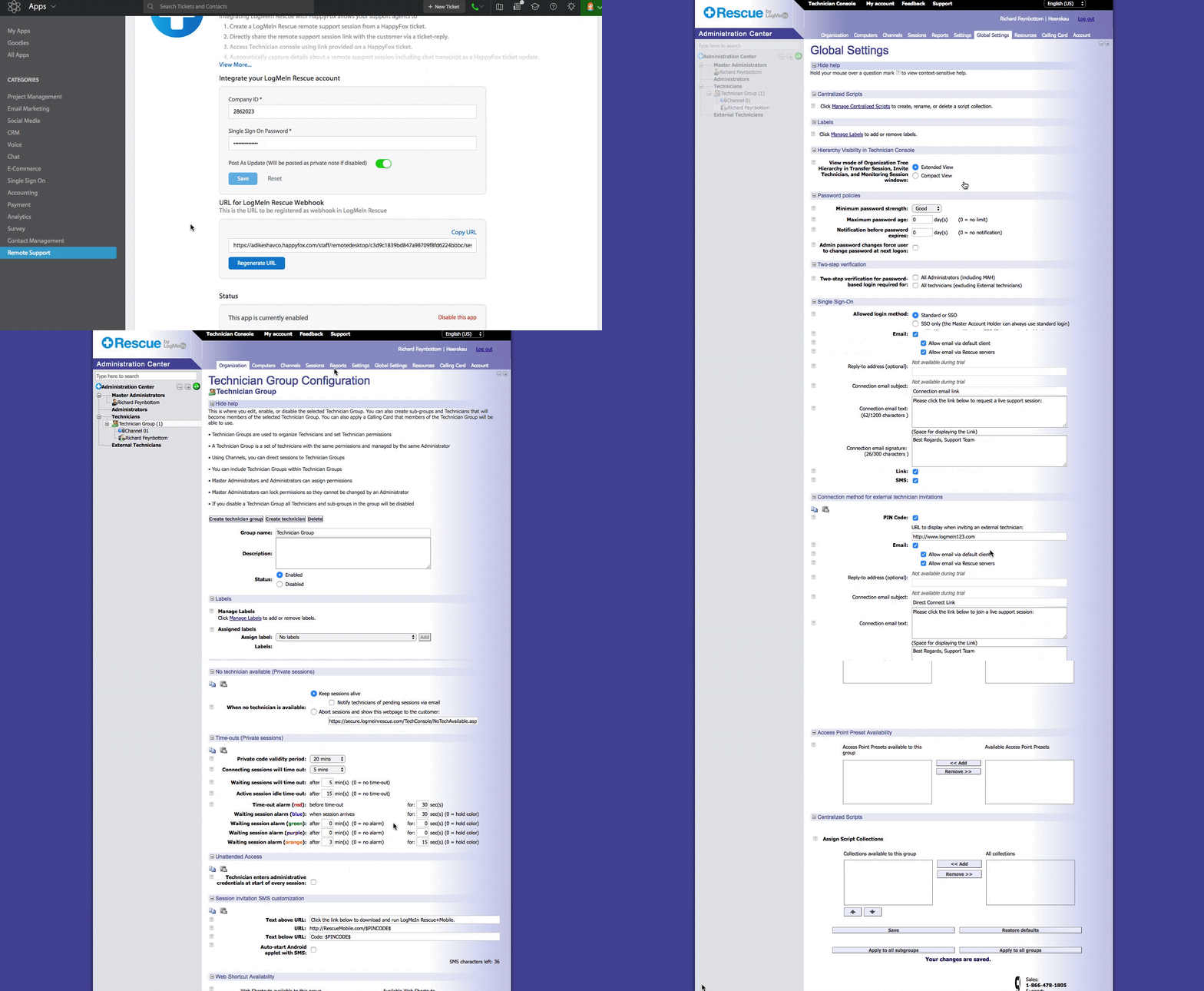
- Get the LogMeIn company ID and Employee SSO password.
- Install the LogMeIn app in HappyFox.
- Update the Post Session URL webhook inside LogMeIn.
Get the LogMeIn company ID and Employee SSO password:
- Go to secure.logmein.com and log in with your credentials.
- Go to the Administration Center.
- Click the Technician name on the left side menu.
- Click the Organization tab and enter the technician's LogMeIn account ID in the Email ID field and Single Sign on ID field. This will be the ID the technician must use to sign in while creating a session through HappyFox.
- Next, click on Global settings.
- Click on Technician Group.
- Create an SSO password and confirm the same.
- Copy the company ID from the box below the password section.

Install the LogMeIn app in HappyFox.
- Log in to HappyFox.
- Go to Apps >> Remote Support >> LogMeIn Rescue.
- Click "Install".
- Provide the "Company Id" and "SSO password" obtained previously.
- Click Save to enable the integration.

Update the Post Session URL webhook inside LogMeIn:
- Copy the Webhook URL after successful installation of the logmeinrescue app.
- Go to secure.logmein.com and log in with your credentials.
- Go to your technician group >> Settings >> Exporting Session Data >> Post Session details to URL when the session is ended by the technician. Paste the Webhook URL copied earlier.
- Click Save.
- The LogMeIn Rescue integration is now complete.
Directly share the remote support session link with the customer via a ticket-reply:
- Log in to your LogMeIn Rescue Technician account from the right sidebar

- Click "Add Session link to the ticket reply".

When the technician ends the support session, the session details with chatlog, end-user system information, total time spent in support, etc., are sent to the HappyFox ticket and added as a private note:

If you would like to know how LogMeIn Rescue integration works with HappyFox Classic, please refer to the document attached.