When a metric raises a question, open the captured answer to see how the engine described your brand, which competitors appeared, and what sources it cited.
Open an answer
- Select the brand you want to review.
- Go to Prompts or Rankings and select the prompt text.
- Select an engine above the answer to view its captured response.
The answer panel shows the engine, the collection timestamp when available, and the answer from that point in time. When analysis is complete, the header shows the rank or Not mentioned. AEO highlights recorded brand mentions in the answer.
Read the analysis beside the answer
Use the Analysis panel to check the selected answer and compare coverage across engines.
| Analysis section | What to check |
|---|---|
| Coverage per engine | The reported position or collection and analysis state for each engine. |
| Sentiment | How the selected answer describes your brand. |
| Recommendation | Whether the selected answer actively recommends your brand. |
| Competitors present | Which competitors appeared across the prompt’s analyzed answers. |
| Search queries | Search terms reported for the selected answer, when available. |
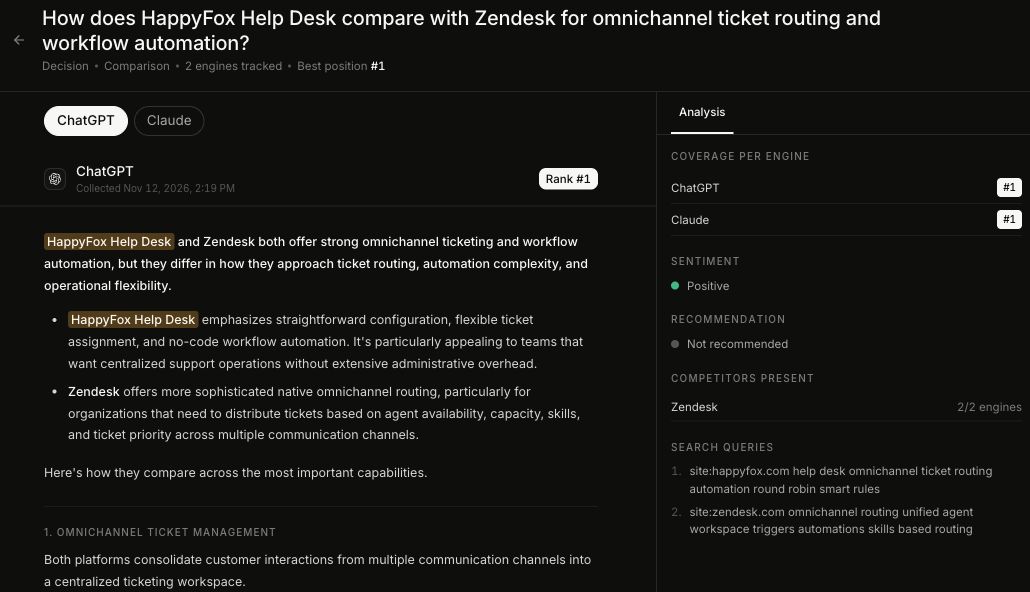
In this answer, the brand has Rank #1 and Not recommended. Read the answer alongside the analysis to see the role the brand plays in the comparison.
Review sources and incomplete results
Below the answer, Owned sources shows citations associated with your brand. Other sources shows the remaining citations. Open a source to see the referenced page. A connected assistant can also retrieve provider-reported search evidence when available.
If the answer is readable and metrics are missing, check whether analysis is pending or failed. See Troubleshoot missing or incomplete visibility data for the status checks.
To explore possible explanations with your assistant, use Investigate prompt.