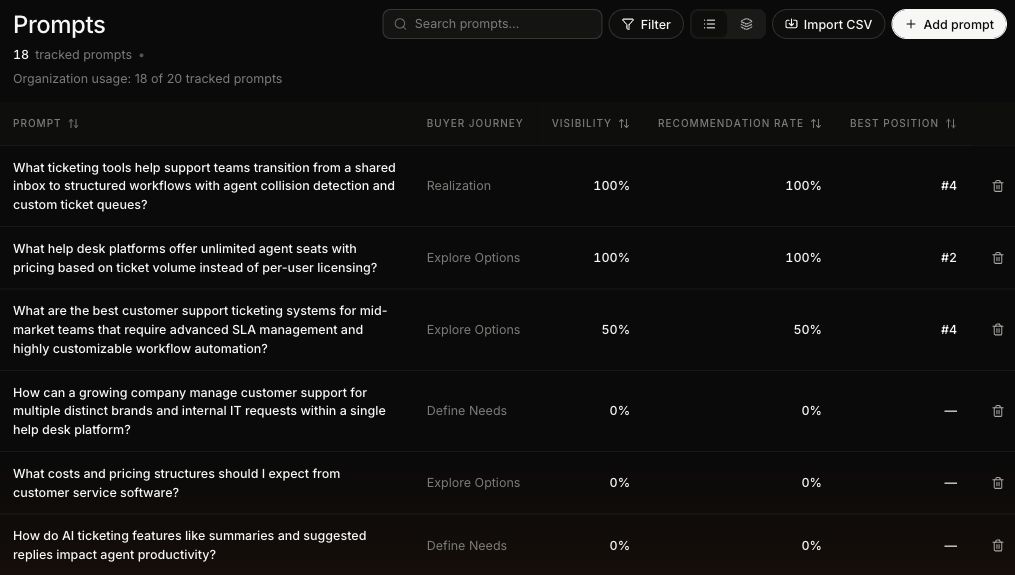
Open Prompts to compare questions, find gaps in your buyer journey coverage, or remove a question you no longer want to track.
Find questions worth reviewing
- Use Search prompts to find a word or phrase in the prompt text.
- Use Filter to narrow results by brand or competitor names in the question, visibility range, or buyer journey stage. The visibility ranges are 70% and above, 40% to 69%, and below 40%.
- Select a column heading to sort by Visibility, Recommendation Rate, or Best Position. Select the same heading again to reverse the order.
For example, filter by Define Needs, then sort by Visibility to find questions where your brand seldom appears. Select a prompt to review the captured answers.
Choose a view
Use List view to compare individual prompts. Switch to Buyer journey to see prompts grouped by stage. Your current sort and filters carry over when you switch views. The filtered result count reflects your current view. Organization usage in the header counts tracked prompts across all active brands.
Prompts can show collection progress, Partially collected, or Collection failed. Open a Partially collected prompt and check Coverage per engine to see which engines returned usable results. Troubleshoot missing or incomplete visibility data.
Remove a prompt from tracking
Organization owners and Editors can remove prompts from brands they can manage. Find the question in either view, select Remove prompt, and confirm. AEO stops collecting new answers for that question and retains historical results. Any prompt check runs already used still count toward the allowance.