Overview:
Department-level permissions allow organizations to define what agents can and cannot do within specific departments, instead of applying the same permissions across the entire account.
This level of control is particularly useful for organizations with multiple departments, where each team may require different access based on their responsibilities.
What’s Currently Supported:
At present, only a limited set of permissions can be assigned at the department level.
Note: All other permissions — even if configured within a department-level role — will continue to apply at the account level.
We are currently expanding support to include additional permissions.
The permissions currently supported at the department level fall into two categories:
Manager-Level Permissions
These allow department managers to configure settings specific to their department:
- Manage Smart Rules
- Manage SLAs
- Manage Canned Actions
- Manage Ticket Templates
- Manage Scheduled Tickets
- Manage Task Templates
Agent Ticket-Level Permissions
These govern how agents interact with tickets assigned to their department:
- Reply to tickets via Email
- Add replies via Agent Panel
- Edit customer replies
- Edit their own replies
- Edit replies from other agents
- Edit their own internal notes
- Edit internal notes from other agents
- Delete tickets
- Delete attachments
- Forward tickets via Email
How It Works:
Each agent is assigned a default role at the account level.
Admins can optionally assign department-specific roles to override the default role within specific departments.
Note: If no department-specific role is assigned, the agent’s account-level role will apply by default.
In the screenshot below, the agent has an account-level role of Administrator. Additionally:
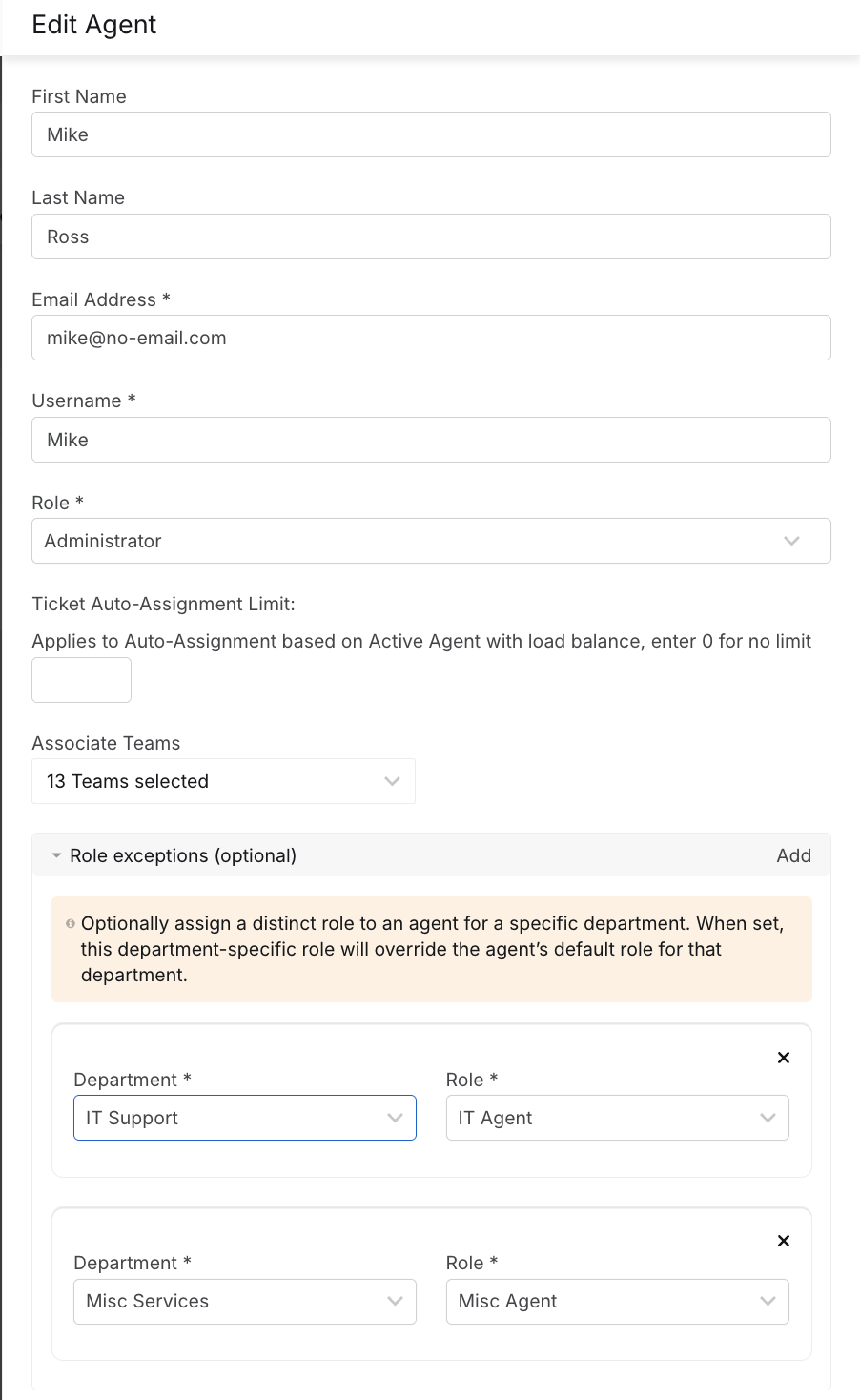
- In IT Support department, they are assigned the IT Agent role
- In Misc Services department, they are assigned the Misc Agent role
This means:
- In IT Support department, the agent will have only the permissions defined in the IT Agent role
- In Misc Services department, they will follow the Misc Agent role
- In all other departments, they retain their Administrator permissions
Examples:
Support Permission – Manage SLAs
Let’s take Manage SLAs as an example:
- If the account-level role includes Manage SLAs, the agent can manage SLAs across all departments where they have Administrator access.
- If the account-level role does not include this permission, but the agent has a department-level role (e.g., IT Agent) with Manage SLAs for IT Support, then:
- The agent can only manage SLAs associated with teams under IT Support
- They cannot view or manage SLAs from other departments
Non-Supported Permission – Export Reports
Some permissions — like Export Reports — are not yet supported at the department level.
Even if Export Reports is added to a department-specific role (e.g., IT Agent), the agent will still be able to export reports for all departments.
This is because the permission is treated as account-level, regardless of department restrictions.
As a result, for such permissions, assigning them in a department-scoped role does not limit their scope. They will continue to apply account-wide until department-level support is added.