Insightly CRM provides a way to manage projects and track contacts, communications, sales, projects, tasks and documents in a single platform.
Integrating Insightly with HappyFox allows your agents to:
- View Insightly contact information in HappyFox ticket-detail and new-ticket form.
- Push HappyFox ticket information as either Contact Notes or Organization Notes to Insightly.
Available to Mighty and above pricing plans
How to Integrate Insightly with HappyFox:
- Log in to HappyFox.
- Go to Apps >> CRM >> Insightly.
- Click Install. In the subsequent screen, you will be asked to provide "Authentication token".
- Get Authentication token from Insightly:
-
Log in to your Insightly account.
- Go to Profile >> User Settings and find "API key". The API key is your authentication token.

-
- Click "Save" to enable the integration.
Insightly information Displayed for the corresponding contact during ticket creation:

Insightly information Displayed for the corresponding contact at ticket details page:

Pushing HappyFox information into Insightly:
To push HappyFox ticket information into Insightly as either "Contact Notes" or "Organisational Notes", you would need to enable this feature:
- Go to Apps >> CRM >> Insightly.
- Click Manage, then Enable "Push Ticket Information to CRM".
- You can choose between "Organizational Notes" and "Contact notes", for the corresponding information to be stored as, inside Insightly.
- Click Save.
Note: If the Manage Apps page had the value ‘Contact Notes’ during a ticket creation and the drop-down value is changed to ‘Organizational Notes’ after the HF ticket creation - the comments for existing will be added to the Contact only. And, the tickets created after the change of drop-down value will adhere to the changed setting in the Manage Apps page.

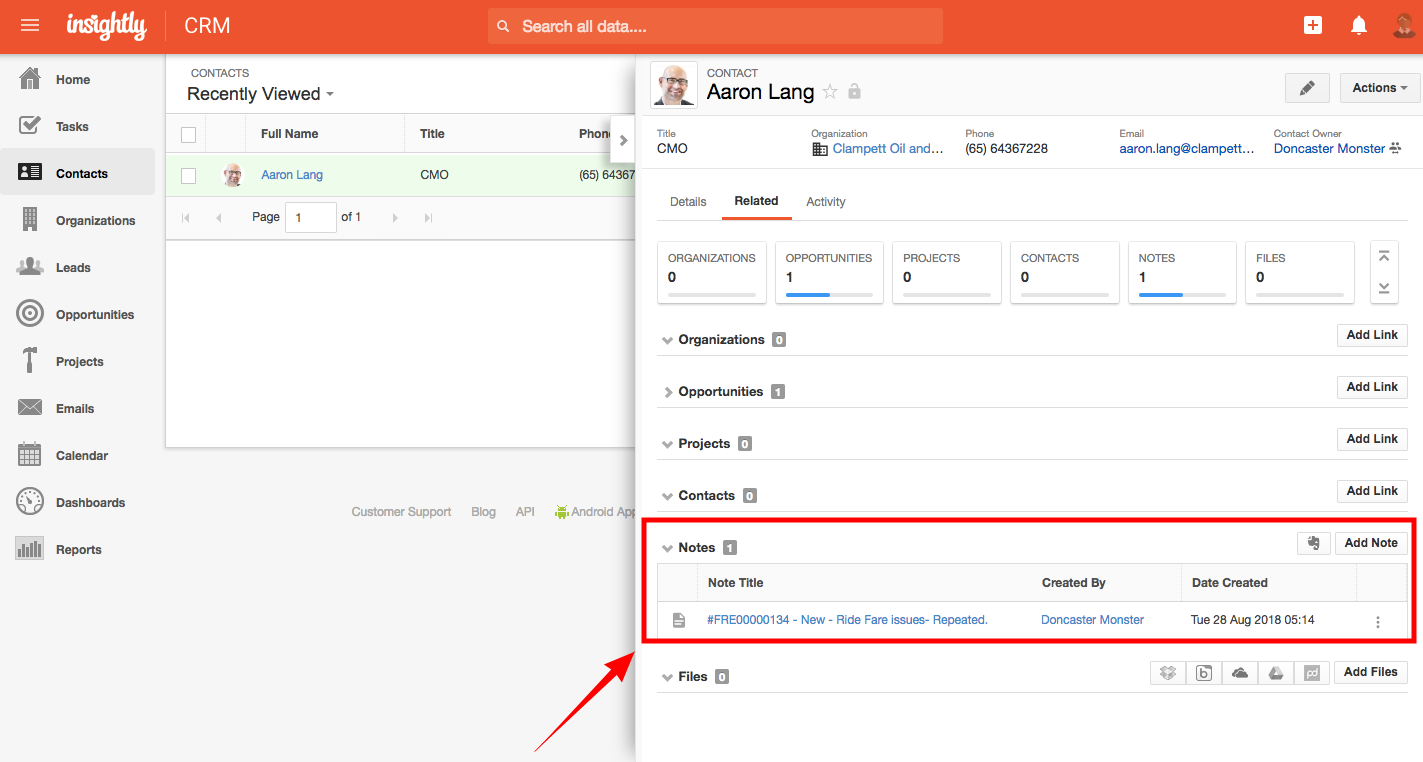
Once it is enabled, you would find the ticket information inside the corresponding contacts/ organization page's notes section inside Insightly:
Disable Insightly App from HappyFox:
Only One CRM app can be active in your HappyFox account. If you would like to try out other CRM apps, you have to disable Insightly app first.
Steps:
- Go to Apps >> CRM >> Insightly.
- Click "Manage".
- To temporarily disable the app, click "disable the app" link inside "Status"
To know how Insightly Integration works with HappyFox Classic, please refer to the document attached.