


 728
728
The Contact Center Report gives you a historical view of your team's call activity and performance. It helps you monitor inbound and outbound call trends, agent performance, and queue behavior — all in one place.
Note: You must have the View Contact Center Report permission enabled in your role to access this dashboard.
Overview
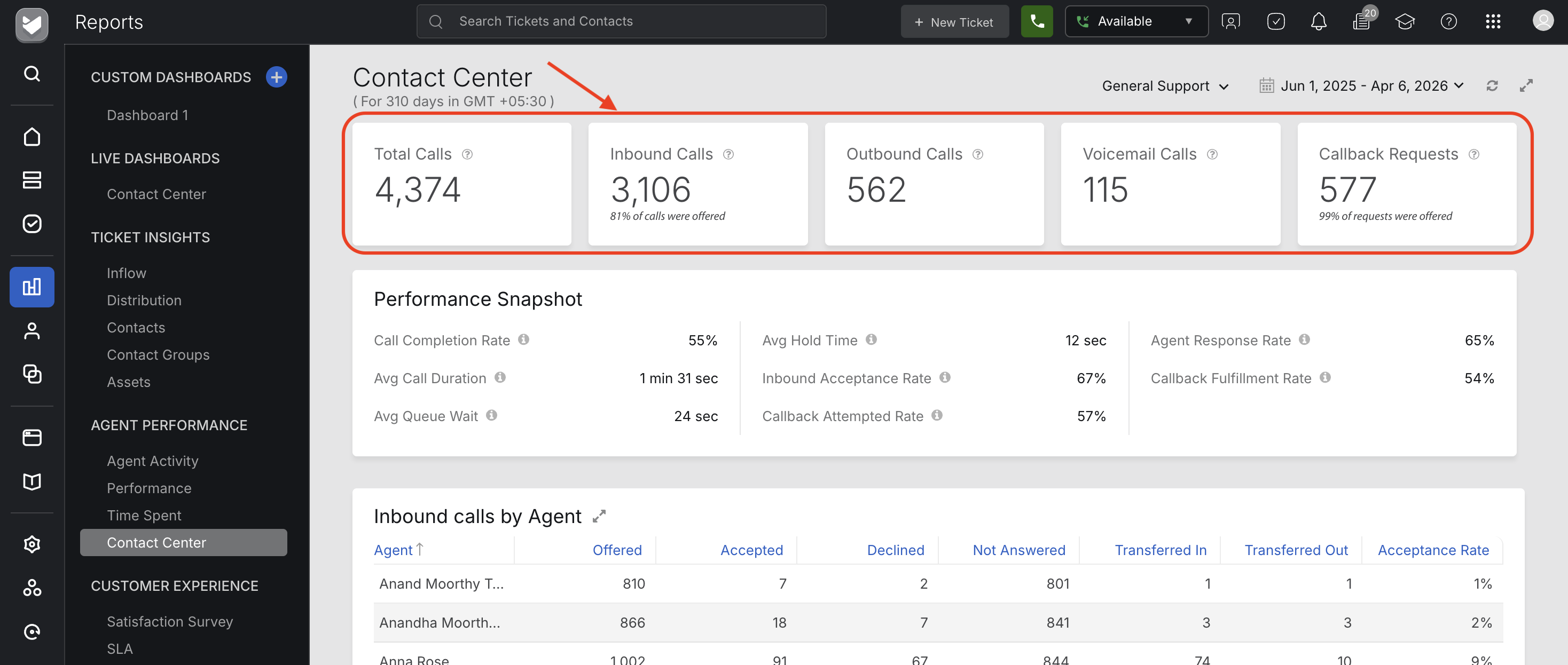
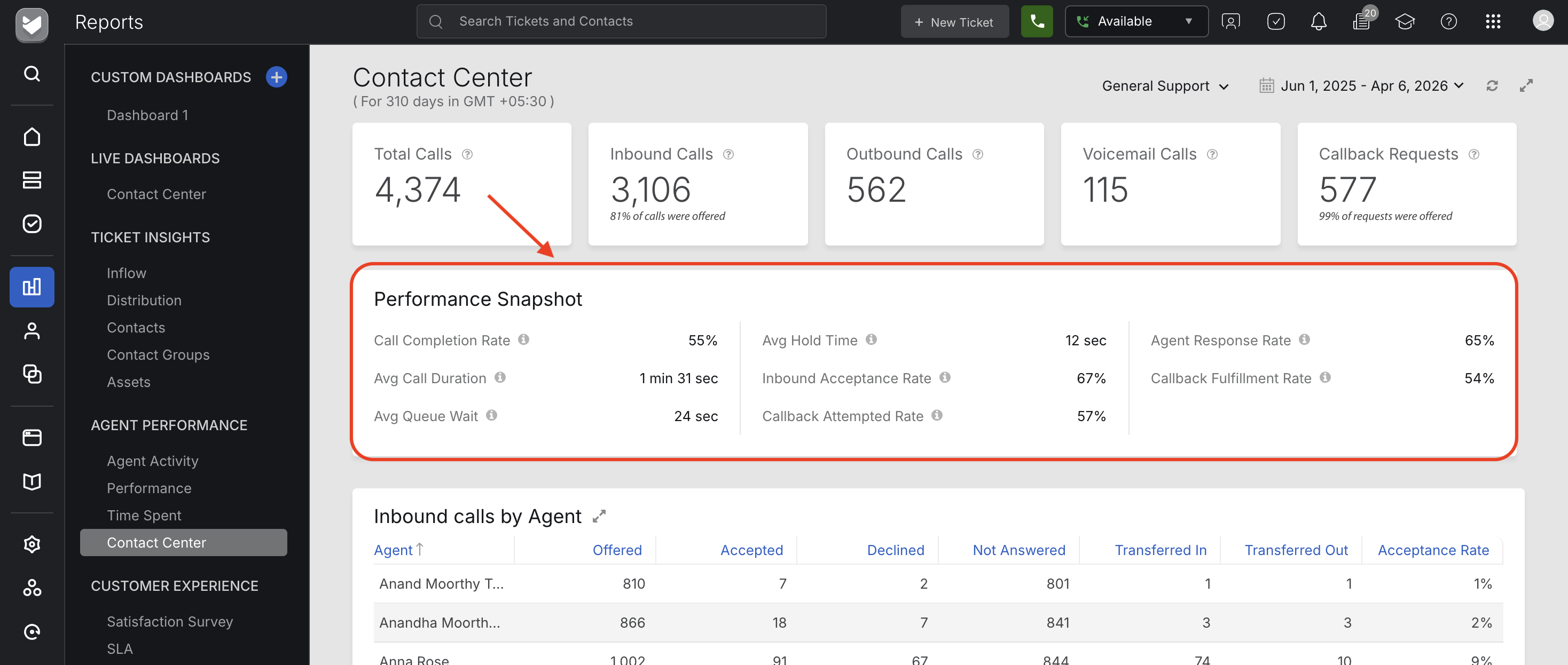
The Reports page shows you how your contact center is performing. It is split into two rows of tiles:
- Section 1 — Volume tiles: How much activity came in
- Section 2 — Performance tiles: How well your team handled it
How Calls Are Classified
Every call that reaches lands in exactly one of four buckets. Understanding this helps you read the numbers correctly.
| Call Type | What it means |
|---|---|
| Inbound | A customer called your number. Includes answered, missed, declined, abandoned, outside-hours, and queue-full calls. Voicemails and callback requests are counted separately. |
| Outbound | An agent proactively dialled a customer. Callback return calls are not included here — they are tracked separately. |
| Callback Request | A customer was in the queue, chose to request a callback instead of waiting, and hung up. The return call the agent makes later is tracked as a callback fulfillment — not an outbound call. |
| Voicemail | A customer left a voicemail message. Only counted when a recording was actually left. If the customer hung up before the beep, it counts as an inbound call instead. |
Important: These four buckets do not overlap. Every call event is counted exactly once across the volume tiles.
Overview Metrics
These high-level metrics give you a quick snapshot of your contact center’s activity:
- Total Calls – Every call event across all four types combined.
- Inbound Calls – Every call a customer made to your contact center, regardless of what happened next. This is your true inbound demand.
- Outbound Calls – The number of calls agents proactively dialled. Reflects agent-initiated activity only.
- Callback Requests - How many customers chose to leave the queue and request a return call instead of waiting on hold. This is a demand signal.
- Voicemail – How many customers left a voicemail recording during the period.
- Call Completion Rate – The percentage of inbound and outbound calls that successfully connected to an agent. Your core effectiveness metric for real-time calls.
- Callback Completion Rate - The percentage of callback requests that were successfully fulfilled — meaning the agent called back and the customer actually answered.
- Average Queue Wait - The average time customers spent waiting in the queue before their call was resolved — regardless of outcome. Measured in seconds.
- Average Call Duration – The average total time a connected call lasted, from the moment the customer entered the queue to the end of the conversation. This is the call from the customer's perspective.
- Average Hold Time – The average time customers were placed on hold. Calculated only for calls where hold was actually used — calls with no hold are not included in this average.
- Inbound acceptance rate - The percentage of inbound calls that were picked up by an agent. Your key signal for whether calls are being missed or declined by the team.
- Callback attempted rate - The percentage of callback requests where the agent made the return call. Reflects how consistently your team is following through on callbacks — regardless of whether the customer answered.
- Agent response rate - Percentage of all calls — inbound and callback — that an agent responded to. Measures agent-side responsiveness only; does not reflect whether the customer answered on callbacks.
- Callback fulfilment rate - The percentage of callback requests that resulted in a successful two-way connection. The end-to-end measure of whether your callback process is actually working for customers.
Quick Reference
| Metric | What it is? | If the number is high... |
| Total Calls | How busy was the contact center | Check if staffing matches demand |
| Total Inbound | How many customers tried to reach you | Check what percentage were actually answered |
| Total Outbound | How much proactive outreach agents did | Good if intentional; investigate if unexpected |
| Total Callback Requests | How many customers opted out of waiting | May indicate queue wait times are too long |
| Total Voicemail | How many customers left a message | Normal after hours; investigate during business hours |
| Call Completion Rate | What % of calls actually connected | Good. Low rate = staffing or routing problem |
| Callback Completion Rate | Are callbacks being honoured | Good. Low rate = callbacks not being fulfilled |
| Avg Queue Wait | How long customers waited on average | Customers are waiting too long — review staffing or routing |
| Avg Call Duration | Total time per connected customer | Check whether queue wait or talk time is the cause |
| Avg Hold Time | How long agents put customers on hold | Agents may need better knowledge tools or training |
| Inbound Acceptance Rate | What % of inbound calls were picked up by an agent | Good. Low rate = calls are being missed or declined by the team |
| Callback Attempted Rate | HWhat % of callback requests had a return call made | Good. Low rate = agents are not following through on callbacks |
| Agent Response Rate | What % of inbound and callback calls an agent responded to | Good. Low rate = agents are not responding to calls coming their way |
| Callback Fulfilment Rate | What % of callback requests resulted in a successful two-way connection | Good. Low rate = callbacks are being attempted but customers are not answering, or agents are not attempting at all |
Agent-wise Inbound Call Summary
This table breaks down each agent's performance for inbound calls:
| Metrics | Description |
| Calls Offered | Number of inbound calls routed to the agent. |
| Accepted | Calls picked up by the agent. |
| Declined | Calls explicitly declined by the agent. |
| Not Answered | Calls that were not accepted or declined within the allowed answer time. |
| Acceptance Rate | Percentage of offered calls that were accepted. |
Agent-wise Outbound Call Summary
This table shows the total outbound calls made by each agent:
| Metrics | Description |
| Outbound Calls | Total outbound calls initiated by the agent. |
Inbound Call Deep Dive
This section breaks down all inbound call outcomes to help you understand how and where calls are being missed or completed.
Completed
Inbound calls successfully connected and handled by agents.
Missed
Calls that were not connected. These are categorized further:
- Ring No Answer – Caller reached an agent, but the agent did not respond.
- Dropped After Queue Wait Time – Caller left after waiting longer than the allowed queue time.
- Queue Full – Caller could not enter the queue because it reached the maximum capacity.
- Outside Business Hours – Caller dialed outside of configured business hours.
Abandoned
Calls where the customer hung up before reaching an agent. Sub-categories include:
- Abandoned in Ringing – Caller disconnected during the ringing phase.
- Abandoned in IVR – Caller disconnected during the IVR offer.
- Abandoned in Queue – Caller disconnected while waiting in the queue.
- Abandoned in Voicemail – Caller disconnected while in the voicemail prompt (without leaving a message).
- Abandoned on hold – Caller disconnected during the hold time.
Note: The Missed and Abandoned sections are collapsed by default. Expand these sections to view their detailed sub-statuses.
Outbound Call Deep Dive
This section provides a detailed breakdown of outbound call outcomes:
- Completed – Outbound calls that successfully connected.
- Discarded – Calls that were canceled before connecting.
- Not Answered – Calls that rang but were not answered.

