Open Citations to see which pages AI engines referenced in the latest reported scan for your tracked prompts. Search for a domain or open a source to find the questions and engines that cited it.
Read citation and source counts
Total citations counts references captured across tracked prompts and engines. Total sources counts distinct sources. Different URLs on one domain can count as separate sources.
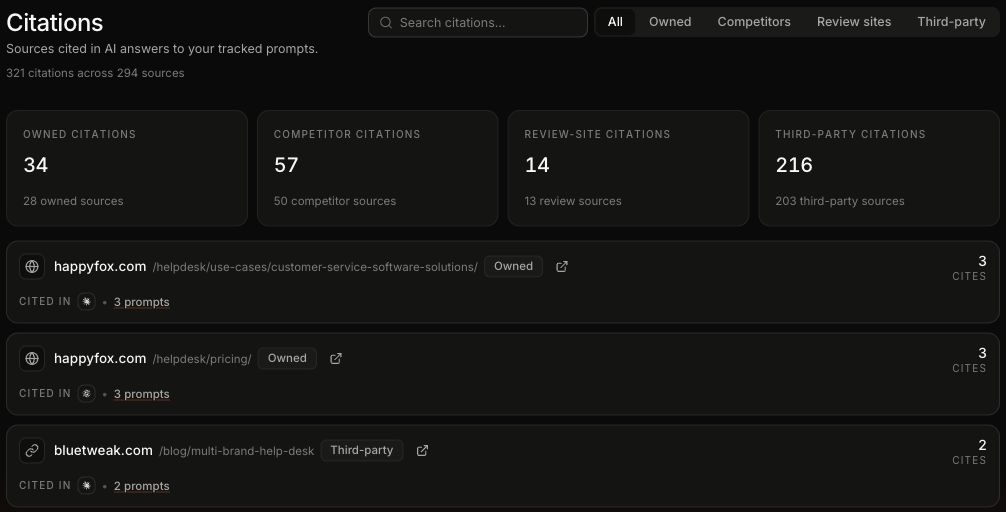
In this example, 34 owned citations came from 28 distinct owned sources. Check the count beside each URL to see which pages were referenced repeatedly.
Find the source you want to inspect
Choose a tab to narrow the list.
- Owned shows pages on your brand’s domains.
- Competitors shows pages on configured competitors’ domains.
- Review sites shows review and comparison platforms.
- Third-party shows other external sources, such as media, blogs, or documentation.
Use All to see every category. Enter a domain in Search citations… to narrow the list. A change to your tracked competitors can change how a source is categorized.
Open the answers behind a citation
- Select the source URL to view the page.
- Open the prompt count on the source card to see which prompts and engines cited it.
- In Prompts or Rankings, open the matching prompt and select the engine.
Read the captured answer to see how it uses the source. Treat any explanation for why the engine selected that page as a hypothesis. If you expected citations and see none, check the answer and source status.
To prioritize content work across several questions, build a growth plan from citations.