AI Agents in HappyFox Help Desk operate in two modes: Supervised Mode and Autopilot Mode.
Agent Mode determines how AI suggestions are applied to tickets and how much control your team has over automated actions.
Supervised Mode
In Supervised Mode, AI Agents suggest actions but do not apply them automatically. Human agents can review and approve updates before they take effect.
How It Works
- When a ticket triggers an AI Agent in Supervised Mode, the suggested update appears in a dedicated container above the last ticket update, labeled “AI Agent Approvals.”
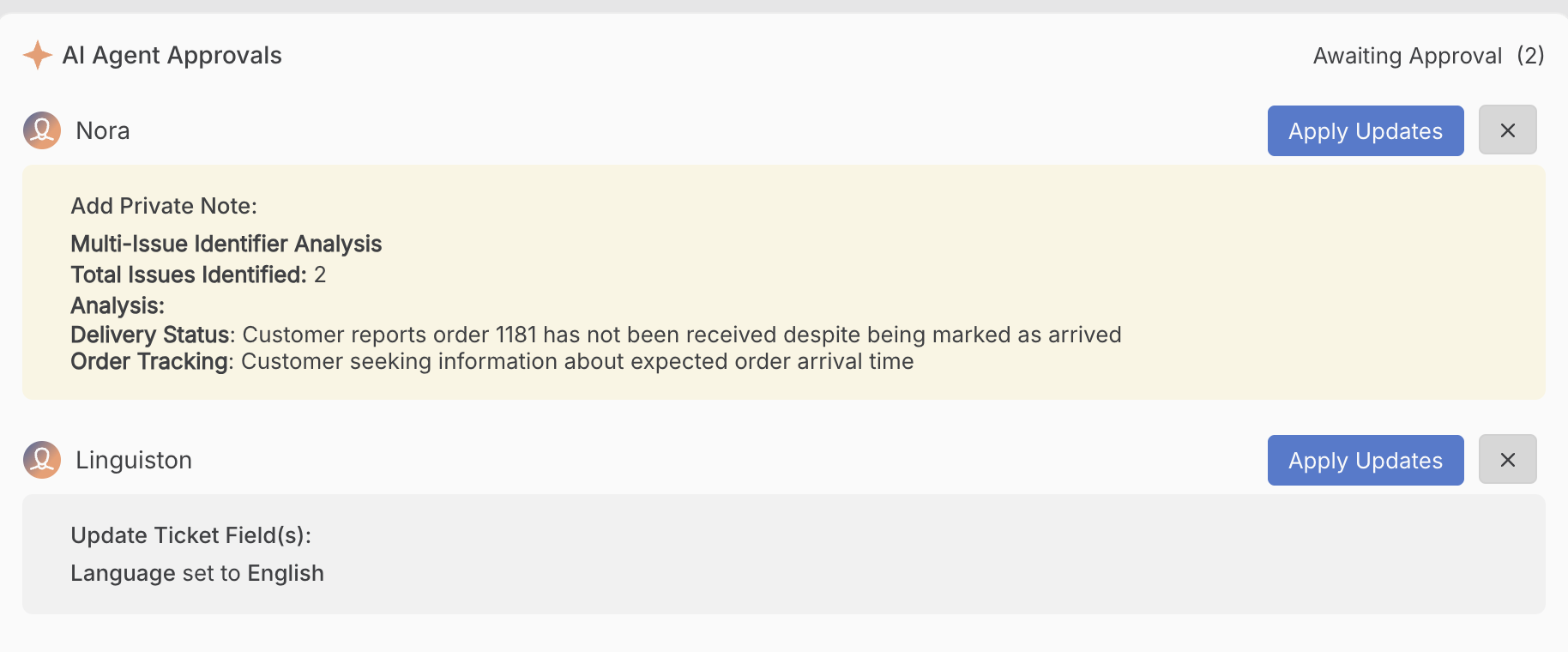
- The container shows:
- Agent name (e.g., Duplicate Ticket Notifier, Translation Agent)
- The Suggested update
- Agent name (e.g., Duplicate Ticket Notifier, Translation Agent)
- Anyone with reply permissions on the ticket can approve or cancel suggestions.
- Multiple suggestions can stack in the approvals container. Each appears separately for review.
- To approve a suggestion:
- Click “Apply Updates” → the update is applied to the ticket.
- A green tick appears with a note like “Approved by John Doe” on the right side of the ticket update.

- Click “Apply Updates” → the update is applied to the ticket.
- To cancel a suggestion:
- Click the X mark next to the request → the update is discarded.
- Click the X mark next to the request → the update is discarded.
- Execution time: Approved updates usually take under 5 minutes to be applied.
Note: For ease of use, you can also access tickets with ‘Pending Approvals’ from the “Waiting for Approvals” ticket queue.
Key Notes:
- Because approvals are handled in a separate container, they do not interfere with other ticket activity.
- Newly hired AI Agents are set to Supervised Mode by default.
Autopilot Mode
In Autopilot Mode, AI Agents act immediately when their triggers and conditions are met. No human approval is required.
- Updates are applied directly to the ticket.
- The ticket activity log still shows the agent name, indicating which actions were automated.
- Best for repetitive or low-risk routine verifications and actions where human review is unnecessary.
Comparing Supervised vs. Autopilot Mode
|
|
|
|
|
|
|
|
|
|
|
|
|
|
|
|
|
|
|
|
|
|
|
|
Tips for Using Supervised Mode
- Start new AI Agents in Supervised Mode to monitor their suggestions before switching to Autopilot.
- Review stacked suggestions regularly - multiple agents can suggest updates on the same ticket.
- Keep an eye on the AI Agent Approvals container to avoid missing pending updates.