Creating a Contact and Ticket for an Anonymous Caller

Apr 15, 2026
 105
105
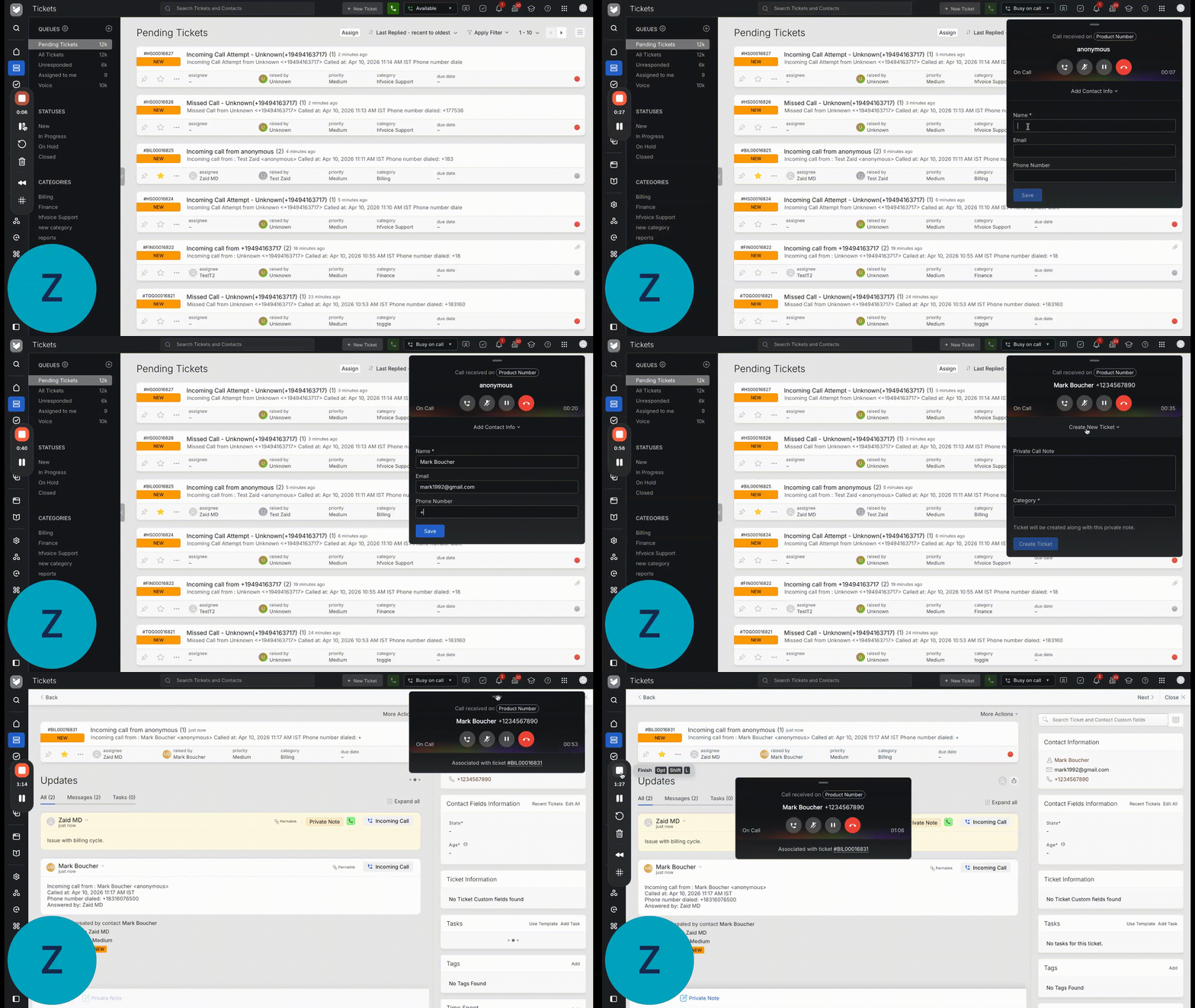
When a call comes in from an anonymous number, agents can create a contact and ticket for the caller directly from the call widget during the call. Unlike regular calls, contacts and tickets are not created automatically for anonymous callers since the system is unable to identify the caller or retrieve their phone number.
What Agents Will See
When an anonymous call comes in, the call widget will display Anonymous instead of a phone number or contact name.
Creating a Contact During the Call
Once the agent accepts the call:
- The widget will show an option to add contact information.
- Enter the caller's details:
- Name — required
- Phone Number or Email — at least one is required
- Click Save to create the contact.
Creating a Ticket
Once the contact is created, a ticket creation option will appear in the widget.
- Optionally, add a private note to capture any context from the call.
- Select the Category for the ticket.
- Click Create Ticket to log the ticket against the created contact.
Note: If the agent creates a contact but does not create a ticket before the call disconnects, a ticket will be automatically created in the fallback category.